Student Curriculum

Can I find Summer Session (A, B,C, D) course enrollments counts over the past several years in Cal Answers?

To see summer session enrollments, go to the Curriculum Long Term Planning Dashboard, Course View Report. Select the summers you want using the Year and Semester filters and the summer session you want to view in the Session Nbr filter.

Note that you will not be able to see course from a single summer session (e.g. Session A), the CEN and EOT snapshots combine all sessions.

Available Data

Student Data dashboards provide Cal Answers users with the ability to view and analyze student data in order to answer questions and improve decision making. The student data dashboards currently available in Cal Answers are:

Student Applicants Student Curriculum Student Demographics and Outcomes...

How do I work with the Snapshot weeks (- and +) in the filter section of the Weekly Enrollment Dashboard ?

Weekly snapshots range from Week -30 to Week +18. These refer to the weeks leading up to the start of the semester and through to the end of the semester. Week 0 contains the official start day of the semester, and Week +01 contains the first day of instruction. Weekly snapshots are taken on Saturday morning of every week during the year.

We have additional resources available if you would like to learn more:

Weekly Enrollment Management Wiki.

Where can I find report documentation and data dictionaries for each of the student data subject areas?

The Overview tab of each dashboard has links to wiki documentation that explains the dashboard reports and a data dictionary that explains the columns used in the prompts and reports.

In addition, the Wikis page has links to the Wiki pages organized by subject area.

Note: you must be connected to Eduroam or GlobalProtect to access the Wiki documentation.

Which student data dashboards and reports include graduate student data?

Most of the student dashboards include graduate student data. However, these dashboards in the Student Demographics & Outcomes subject area do not show graduate student data:

Graduation, Retention and Time to Degree Multiple Majors

Check out the Cal Answers Student Data Subject Areas, Dashboards and Filters Map job aid. Reports with an * include undergraduate data only. All other reports include both Graduate and Undergraduate student data.

Where can I see what Majors are taking my courses?

You can use the Student Curriculum -> Students & Courses dashboard -> Majors in Courses report to see Course Enrollment counts grouped by major for the filtered College/School, Division, Department, Course Subject, Course and/or Course Section.

New Summer Reports in Weekly Enrollment Mgmt Dashboard

August 21, 2025

The Student Curriculum - Weekly Enrollment Management dashboard now includes several new reports, most of which focus on Summer course offerings:

Summer Campus Summary - This report features 3 key metrics for a Summer term, including offering counts, enrollment counts, and a count of courses that have reached their enrollment limits, as well as comparative data for the equivalent week from the prior Summer term. You can select one week at a time to track how courses are filling, from the beginning of registration through the add/drop deadline. Summer Course...
Does the Summer term lead or trail in the academic calendar?

The Summer term leads in the UC Berkeley academic calendar. For example, the 2024-25 academic year consists of Summer 2024, Fall 2024, and Spring 2025.

Note that the Financial Aid Year treats Summer as a trailing term, however. For example, the 2024-25 financial aid year consists of Fall 2024, Spring 2025, and Summer 2025.

How do I select multiple filter values in the dashboard prompts at the same time?

Single vs. Multi-Select

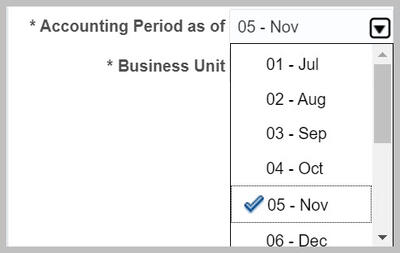
Prompts with a checkmark allow you to select one value.

Drop-down menu with single selection allowed

Prompts with checkboxes allow you to select multiple values.

...