
How to Remove Access to Financials Dashboards
- Go to https://sara.berkeley.edu/
- Select Request Access for Yourself or Your Employee

- Select CalNet Authorization
- Once you have logged in, select Request Access for Your Employee
- Select Request Deletion of Access
- Select “BAIRS and BIS”, enter the Employee fields, check the removal reason, supplement the reason with an explanation in the Email Message, and click “submit”. “Last Effective Date” represents the last date the employee should have access to Cal Answers Financials.

Check the status of your request
Whether you submitted a request for yourself or for your employee, you can check the status of your request.
1. Follow Steps 1-4 from above
2. Select Check Status of a Request
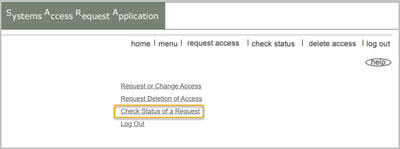
3. Search by either the request number or by date requested
4. You can review the status at the top